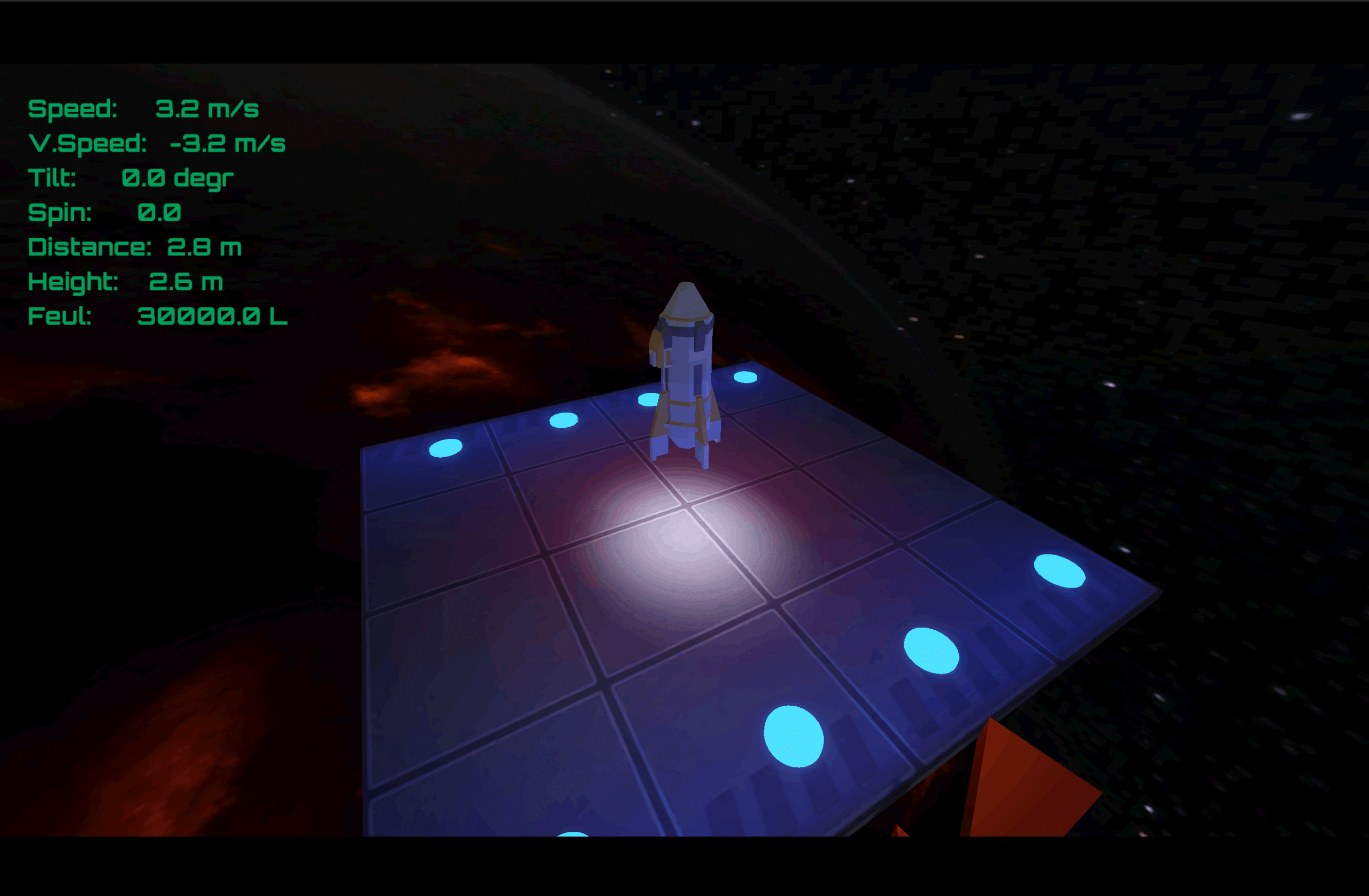
This is an open source C# Godot mono Rocket simulator game. It was originally featured in the Udemy Godot course for 3D game and implemented in GDScript. I’ve decided while doing that course that I’ll implement it in C#

link to the full Github project: https://github.com/vladimir-garnovski/Rocket-simulator-game-CSharp-Godot-mono.
The goal of the game is to navigate a rocket to a landing pad and “gently” land it there. This game used Godot physics heavily. And implementing it will give you a great overview of them.
Project Tree Overview

Explanation of the folder structure.
- Assets – Contains all the assets of the project (models, sounds etc).
- Classes contains classes that we use in our code, which don’t have scenes.
- Globals contain classes used through the game.
- Scenes contains all the scenes in the game, each scene will be in a sub folder.
Classes in the project

Here’s an explanation of the classes that we have:
LandingResult.cs
using Godot;
using System;

public partial class LandingResult : RefCounted
{
    public enum Outcome { LANDED, CRASHED, LOST};

    public Outcome outcome;
    public int score;
    public bool newHighScore = false;
    public int highScore = 0;
}
Note: You can change the variables to properties with getters and setters. The main reason I left it like this is to later compare with the GDScript version of the game.
This classes purpose is to tell use what was the outcome when the game ended. Did we land,crash or got lost (out of fuel in space).
RocketTelemetry.cs
using Godot;
using System;

public partial class RocketTelemetry : RefCounted
{
    public float Speed {get;set;} = 0.0f;
    public float VerticalSpeed {get;set;} = 0.0f;
    public float Distance {get;set;} = 0.0f;
    public float HeightDelta {get;set;} = 0.0f;
    public float Tilt {get;set;} = 0.0f;
    public float Spin {get;set;} = 0.0f;
    public float Fuel {get;set;} = 0.0f;

    public override string ToString()
    {
        return $"Speed:     {Speed.ToString("0.0")} m/s \n"+
               $"V.Speed:   {VerticalSpeed.ToString("0.0")} m/s \n"+
               $"Tilt:      {Tilt.ToString("0.0")} degr \n"+
               $"Spin:      {Spin.ToString("0.0")}  \n"+
               $"Distance:  {Distance.ToString("0.0")} m \n"+
               $"Height:    {HeightDelta.ToString("0.0")} m \n"+
               $"Feul:      {(Fuel*1000).ToString("0.0")} L";

    }
}
This class’s sole purpose is to return a nice new line string with all the parameters of the rocket:
- Rocket speed & vertical speed
- The distance from the landing pad
- Height delta (in accordance with the Y axis)
- Tilt of the rocket
- Spin
- Fuel
ScoreData.cs
using Godot;
using System;

public partial class ScoreData : Resource
{
    private const string SAVE_PATH = "user://lander_score.tres";
    public int _highScore = 0;

    public bool Submit(int score)
    {
        if (score <= _highScore)
            return false;
        _highScore = score;
        ResourceSaver.Save(this, SAVE_PATH);
        return true;
    }
    public static ScoreData LoadOrCreate()
    {
        if(ResourceLoader.Exists(SAVE_PATH))
        {
            return (ScoreData)ResourceLoader.Load(SAVE_PATH);
        }
        return new ScoreData();
    }
}
This class’s job is to manage the score and high score, saving it to a file. Not much to say here, if the score is higher than the high score we’ll override it.
Globals

We have two globals in this game. One is the GameManager and one is the SignalHub.
GameManager.cs
using Godot;
using System;

public partial class GameManager : Node
{
     public readonly PackedScene GameScene = ResourceLoader.Load<PackedScene>("res://scenes/Game/Game.tscn");
     public readonly PackedScene MainScene = ResourceLoader.Load<PackedScene>("res://scenes/Main/Main.tscn");

     public static GameManager Instance{get;private set;}

     public ScoreData _scoreData;
     public int HighScore
     {
        get
        {
          return _scoreData._highScore;
        }
     }

    public bool SubmitScore(int score)
    {
        return _scoreData.Submit(score);
    }
    public override void _Ready()
    {
        Instance = this;
        _scoreData = ScoreData.LoadOrCreate();
    }

    public void LoadMain() // Why can't it work with static (?)
    {
        GetTree().ChangeSceneToPacked(MainScene);
    }
    public void LoadGame()
    {
        GetTree().ChangeSceneToPacked(GameScene);
    }


}
Our GameManager manages the scene transition (Main screen and Game scene). And also allows us to submit score data.
SignalHub.cs
using Godot;

public partial class SignalHub : Node
{
    public static SignalHub Instance {get; private set;}

    [Signal]
    public delegate void TelemetryUpdatedEventHandler(RocketTelemetry rocketTelemetry);
    [Signal]
    public delegate void GameOverEventHandler(LandingResult result);

    public override void _Ready()
    {
        Instance = this;
    }

	public static void EmitTelemetryUpdated(RocketTelemetry rocketTelemetry)
	{
		Instance.EmitSignal(SignalName.TelemetryUpdated, rocketTelemetry);
	}
    public static void EmitGameOver(LandingResult result)
	{
		Instance.EmitSignal(SignalName.GameOver, result);
	}
}Our signal hub contains two custom signal with their respective emitter function.
- TelemetryUpdated – This fires when there’s an update in the telemetry
- GameOver – this fires when the game is over
If you want to know more about the signal hub pattern, I’ve got an easy tutorial for it heresc
Scenes in the Game

The Game Scene
The Game scene is the scene in which the actual game takes place. In the inspector it looks like this:

The child node we have are:
- WorldEnvironment & DirectionalLight3D – those are responsible for that backhround (skybox) and the lighting.
- RocketCam – the camera that follows the player
- LandingPad – The pad which the player is supposed to land on to win the game
- Rocket – this our actual player, the rocket,
- -Hud – this is the display which will show use the telemetry of the rocket
- Wind – wind force which will make the game more hard (even though there’s neighther wind nor gravity in space.
Hud Scene
The Hud is a Control node that is there to help display the 2D image of the telemetry. It also shows the “Game Over” and controls the crash,landing and music sounds.

Hud script hud.cs
using Godot;
using System;
using System.ComponentModel;
using System.Runtime.CompilerServices;
using System.Text.RegularExpressions;

public partial class Hud : Control
{
    private Label _label;
    [Export] private ColorRect _gameOverRect;
    [Export] private Timer _gameOverTimer;
    [Export] private Label _resultLabel;

    [Export] private AudioStreamPlayer _crashSound;
    [Export] private AudioStreamPlayer _landSound;

    public override void _Ready()
    {
        _label = GetNode<Label>("MC/Label");

        _gameOverTimer.Timeout += OnGameOverTimerTimeOut;
        SignalHub.Instance.TelemetryUpdated += OnTelemetryUpdated;
        SignalHub.Instance.GameOver += OnGameOver;
    }

    private void OnGameOverTimerTimeOut()
    {
        GetTree().Paused = true;
    }

    private void OnGameOver(LandingResult result)
    {
        switch (result.outcome)
        {
            case LandingResult.Outcome.LANDED:
                _resultLabel.Text = "LANDED - Score:"+result.score;
                if (result.newHighScore)
                    _resultLabel.Text+=" NEW BEST!";
                _landSound.Play(23.0f);
            break;
            case LandingResult.Outcome.CRASHED:
                _resultLabel.Text = "CRASHED";
                _crashSound.Play();
            break;
            case LandingResult.Outcome.LOST:
                _resultLabel.Text = "LOST";
                _crashSound.Play();
            break;

        }
        _gameOverRect.Visible = true;
        _gameOverTimer.Start();
    }

    private void OnTelemetryUpdated(RocketTelemetry rocketTelemetry)
    {
       _label.Text = rocketTelemetry.ToString();
    }
    public override void _ExitTree()
    {
        SignalHub.Instance.TelemetryUpdated -= OnTelemetryUpdated;
        SignalHub.Instance.GameOver -= OnGameOver;
         _gameOverTimer.Timeout -= OnGameOverTimerTimeOut;
    }
    public override void _UnhandledInput(InputEvent @event)
    {
        if (@event.IsActionPressed("ui_cancel") )
        {
            GameManager.Instance.LoadMain();
        }
    }
}
The Hud sends is connected to the signal hud’s Telemetry updated and Game Over signals.
private void OnGameOver(LandingResult result) {..}This method determines “How the game will end” aka what will be shown.
private void OnTelemetryUpdated(RocketTelemetry rocketTelemetry) {..}This method updates the telemetry.
We also have one _UnhandledInput function, a timeout and _Ready().
LandingLight Scene
This is a small cosmetic element for the landing pad. It doesn’t have any children, it’s idea is to emit “fake light” (be lit but actually not emitting an light per say).

All the magic happens in the IDE.

LandingPad Scene

This landing pad is basically a non-living StaticBody3D(not on the root node!). It might look complicated but it’s not.
- The tiles are just 3D models
- The base is a container for a StaticBody3D with a CollisionShape3D

- The landing lights and lights are just for cosmetics:

Main scene
The main scene is our “Main menu” scene. This is what the player sees when he enters the game. Pretty self explanatory. Labels and music:

Main scene script
using Godot;
using System;

public partial class Main : Control
{

    public override void _Ready()
    {
        GetTree().Paused = false;
    }
    public override void _UnhandledInput(InputEvent @event)
    {

        if (@event.IsActionPressed("ui_accept") )
        {
            GameManager.Instance.LoadGame();
        }
    }
}
The only job of this script is to wait for the player to press a key then change scenes.
Rocket Scene
That’s our rocket. A nice RigidBody3D scene with some children. Right off the bat you’ll notice 2 collision shapes. The second one was added to avoid the player landing flat on the landing pad thus not invoking some of the parameters needed for the triggering Game Over.

Other than that you’ll notice some thrusters there which are independent scenes.
Rocket.cs code
using Godot;
using System;

public partial class Rocket : RigidBody3D
{
    private const float THRUST_FORCE = 15.0f;
    private const float SIDE_THRUST_FORCE = 2.5f;
    private const float TORQUE_STRENGTH = 1.5f;

    private const float MAX_LANDING_SPEED = 5.0f;

    private const float MAX_LANDING_TILT = 10.0f;

    private const float MAX_FUEL = 30.0f;

    private const float FUEL_DROP = 50.0f;

    private const float MAX_DISTANCE =  6.0f;

    [Export] Node3D _landingPad;

    [Export] private Thrust _thrust;
    [Export] private Thrust _thrustL;
    [Export] private Thrust _thrustR;
    [Export] private Timer _crashedTimer;
    [Export] private Wind _wind;

    private float _lastSpeed = 0.0f;
    private float _fuel =  MAX_FUEL;
    private bool _outOfFuel = false;

    private float _fuelOutY = 0.0f;

    public override void _Ready()
    {
        BodyEntered+= OnBodyEntered;
        SleepingStateChanged += OnSleepingStateChanged;
        _crashedTimer.Timeout += CrashedTimeout;
    }


    public override void _PhysicsProcess(double delta)
    {
        if (_wind != null && GetContactCount() == 0)
        {
            ApplyCentralForce(_wind.WindForce);
        }
        if(!_outOfFuel)
        {
            ApplyMainThrust((float)delta);
            ApplySideThrusters((float)delta);
            ApplyRotation();
        }

        EmitTelemetry();
        CheckFuel();

        _lastSpeed = LinearVelocity.Length();
    }
    private int CalculateScore()
    {
        int fuelScore = (int)((_fuel / MAX_FUEL) * 1000);
        float dist = GlobalPosition.DistanceTo(_landingPad.GlobalPosition);
        double tmp = (1.0 - dist) / MAX_DISTANCE;

        int distScore = (int)Math.Clamp( tmp,0.0,1.0) * 1000;

        return fuelScore + distScore;

    }
    private void ApplyRotation()
    {


        float pitch = Input.GetAxis("pitch_down","pitch_up");
        float yaw = Input.GetAxis("yaw_left","yaw_right");
        Vector3 torque = GlobalTransform.Basis.X * pitch * TORQUE_STRENGTH;
        torque += GlobalTransform.Basis.Y * yaw * TORQUE_STRENGTH;
        ApplyTorque(torque);
    }

    private void ApplyMainThrust(float delta)
    {
        bool thrustApplied = Input.IsActionPressed("thrust");
        if (thrustApplied)
        {
            _fuel -= delta;
            ApplyCentralForce(GlobalTransform.Basis.Y * THRUST_FORCE);
        }
        _thrust.Update(thrustApplied,(float)delta);
    }

    private void ApplySideThrusters(float delta)
    {
        bool thrustLeftApplied = Input.IsActionPressed("roll_left");
        bool thrustRightApplied = Input.IsActionPressed("roll_right");

        if (thrustLeftApplied)
        {
            ApplySideThrust(_thrustL,(float)delta);

        }
        if (thrustRightApplied)
        {
            ApplySideThrust(_thrustR,(float)delta);
        }

        _thrustL.Update(thrustLeftApplied,(float)delta);
        _thrustR.Update(thrustRightApplied,(float)delta);
    }

    private void ApplySideThrust(Thrust thruster, float delta)
    {
        _fuel -= delta / 3;
        Vector3 offset = thruster.GlobalPosition - GlobalPosition;
        ApplyForce(GlobalTransform.Basis.Y * SIDE_THRUST_FORCE, offset);
    }
    private void EmitTelemetry()
    {
        RocketTelemetry tel = new RocketTelemetry();
        tel.Speed  = this.LinearVelocity.Length();
        tel.VerticalSpeed = this.LinearVelocity.Y;
        tel.Tilt = GetTilt();
        tel.Fuel = _fuel;
        if (_landingPad != null)
        {
            tel.Distance = this.GlobalPosition.DistanceTo(_landingPad.GlobalPosition);
            tel.HeightDelta = Mathf.Abs(this.GlobalPosition.Y - _landingPad.GlobalPosition.Y);

        }

        // Signal Stuff
        SignalHub.EmitTelemetryUpdated(tel);
    }
    private float GetTilt()
    {
        return Mathf.RadToDeg(GlobalTransform.Basis.Y.AngleTo(Vector3.Up));;
    }
    private void OnSleepingStateChanged()
    {
        GD.Print("OnSleepingModeChanged fired:",Sleeping);
        if(Sleeping)
        {
            if (IsPhysicsProcessing())
            {
                if (GetTilt() < MAX_LANDING_TILT)
                {
                    GameOver(LandingResult.Outcome.LANDED);
                }
                else
                {
                    GameOver(LandingResult.Outcome.CRASHED);
                }

            }
        }
    }
    private void CheckFuel()
    {
        if (_fuel <= 0 && _outOfFuel != true)
        {
            _outOfFuel = true;
            _fuel = 0.0f;
            _fuelOutY = GlobalPosition.Y;
        }
        else if(_outOfFuel && Math.Abs(_fuelOutY) > FUEL_DROP)
        {
            GD.Print("Lost in space");
            _thrust.TurnOff();
            _thrustL.TurnOff();
            _thrustR.TurnOff();
            GameOver(LandingResult.Outcome.LOST);
            Freeze = true;
        }


    }
    private void OnBodyEntered(Node body)
    {
        if (_lastSpeed > MAX_LANDING_SPEED)
        {
            GD.Print("Crashed!");
            _crashedTimer.Start();
            GameOver(LandingResult.Outcome.CRASHED);

        }
    }
    private void CrashedTimeout()
    {
        GD.Print("Game Over..");
        Freeze = true;
        _crashedTimer.Timeout -= CrashedTimeout;
    }
    public void GameOver(LandingResult.Outcome outcome)
    {
        LandingResult result = new LandingResult();
        result.outcome = outcome;
        if( result.outcome == LandingResult.Outcome.LANDED)
        {
            result.score = CalculateScore();
            result.newHighScore = GameManager.Instance.SubmitScore(result.score);
            result.highScore = GameManager.Instance.HighScore;
        }

        SetPhysicsProcess(false);
        SignalHub.EmitGameOver(result);
    }
}
In bullet points here’s what the script does:
- Main thrust – W key fires the engine along the ship’s local up, burns fuel
- Side thrusters – A/D fire roll thrusters at an offset, creating physically correct roll
- Rotation – Arrow keys apply torque for pitch and yaw
- Wind – Applies lateral force from the Wind node when airborne
- Telemetry – Packs speed, tilt, distance, fuel, etc. into a data object and emits it every frame via SignalHub
- Fuel tracking – Burns fuel per second, triggers LOST state if you drift 50m below your fuel-out altitude
- Crash detection – On contact: speed > 5 m/s = crash. On settling: tilt › 10° = tipped over = crash
- Landing detection – Settles to rest with tilt ‹ 10° = successful landing, score calculated
RocketCam Scene
The Rocket Cams job is to follow the rocket so we’d see it. It also has a nice spotlight.

The Thrust Scene

The thrust scene is basically an advanced cone that has a Spotlight and a Thrust sound. It’s for the visual part of the rocket.
Thrusts.cs
using Godot;
using System;


public partial class Thrust : Node3D
{
    [Export] private MeshInstance3D _cone;
    [Export] private SpotLight3D _spotLight;
    [Export] private AudioStreamPlayer3D _thrustSound;

    const float CONE_IDLE = 0.3f;
    const float CONE_MAX = 1.0f;
    const float CONE_FLICKER =  0.08f;
    const float CONE_LERP = 12.0f;

    const float SPOTLIGHT_IDLE = 7.0f;
    const float SPOTLIGHT_MAX = 10.0f;
    const float SPOTLIGHT_FLICKER =  0.12f;
    const float SPOTLIGHT_LERP = 12.0f;

    const float SOUND_IDLE_DB = -20.0f;
    const float SOUND_MAX_DB = -2.0f;
    const float SOUND_LERP = 6.0f;
    const float PITCH_IDLE = 0.8f;
    const float PITCH_MAX = 1.7f;


    public override void _Ready()
    {
        _cone.Scale = CONE_IDLE * Vector3.One;
        _thrustSound.VolumeDb = SOUND_IDLE_DB;

    }
    public void UpdateThrustSound(bool thrustOn, float delta)
    {
        float targetVolume =  SOUND_IDLE_DB;
        float targetPitch = PITCH_IDLE;
        if(thrustOn)
        {
            targetVolume = SOUND_MAX_DB;
            targetPitch = PITCH_MAX;
        }
        _thrustSound.VolumeDb = float.Lerp(_thrustSound.VolumeDb, targetVolume, SOUND_LERP * delta);
        _thrustSound.PitchScale = float.Lerp(_thrustSound.PitchScale, targetPitch, SOUND_LERP * delta);
    }
    public void Update(bool thrustOn, float delta)
    {
        UpdateCone(thrustOn, delta);
        UpdateSpot(thrustOn, delta);
        UpdateThrustSound(thrustOn, delta);

    }
    private void UpdateCone(bool thrustOn, float delta)
    {
        float targetScale = CONE_IDLE;
        if(thrustOn)
        {
            targetScale = CONE_MAX + (float)GD.RandRange(-CONE_FLICKER,CONE_FLICKER);
        }
        _cone.Scale = _cone.Scale.Lerp(targetScale * Vector3.One, delta * CONE_LERP);
    }
    private void UpdateSpot(bool thrustOn, float delta)
    {
        float targetEnergy = SPOTLIGHT_IDLE;
        if(thrustOn)
        {
            targetEnergy = SPOTLIGHT_MAX +(float)GD.RandRange(-SPOTLIGHT_FLICKER,SPOTLIGHT_FLICKER);

        }
        _spotLight.LightEnergy = float.Lerp(targetEnergy , delta * SPOTLIGHT_LERP,0.1f);

    }
    public void TurnOff()
    {
        _thrustSound.Stop();
        _spotLight.Visible = false;
        _cone.Scale = CONE_IDLE * Vector3.One;
    }
}
The point of this script is to allow the thrust cone to scale, turn on and off. Mainly visually things here.
The Wind Scene
The wind scene’s purpose is to apply some force in the game to make it more difficult. It also contains a visual arrow of the direction of the wind.

Wind.cs
using Godot;
using System;

public partial class Wind : Node3D
{
    private const float TURN_RATE = 1.0f;
    private const float BASE_FORCE = 0.16f;

    [Export] Timer _timer;

    private float _targetAngle;

    public Vector3 WindForce {get;set;} = Vector3.Zero;

    public override void _Ready()
    {
        _targetAngle = (float)(GD.Randf() * 2 * Math.PI);
        _timer.Timeout += OnTimeout;
    }
    public override void _PhysicsProcess(double delta)
    {
        Mathf.Lerp(Rotation.Y, _targetAngle , delta);
        this.SetRotation(new Vector3(
                            0,
                            (float)Mathf.Lerp(Rotation.Y, _targetAngle , delta * TURN_RATE ),
                            0)
                             );
        WindForce = Transform.Basis.Z * BASE_FORCE;
    }
    private void OnTimeout()
    {
        ChangeAngle();
    }

    private void ChangeAngle()
    {
        _targetAngle = (float)(-Math.PI/ 9)+ (float)(GD.Randf() *  Math.PI/ 9);
    }
}