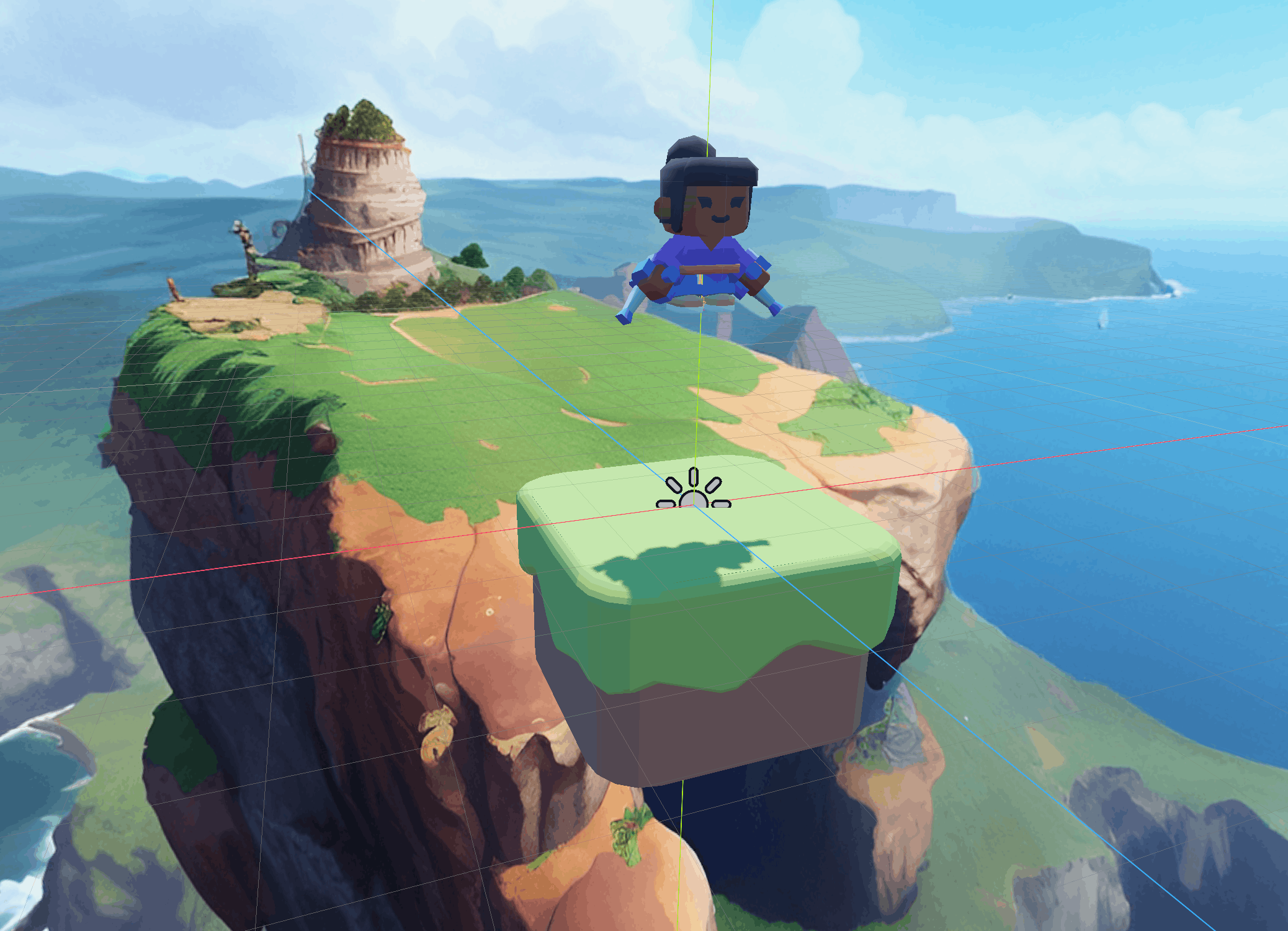
SkyPogo is a simple 3D Godot game in which the player jumps up on platforms endlessly, reaching for the highest score possible. The platforms vanish once you land on them, and new ones appear above — so you have to keep moving and aim your bounces. Miss a platform and fall too far, and it’s game over.
It’s a simple game, but from building it I’ve learned a ton about Godot. The original idea came from Richard’s Complete 3D Godot 4 Game Development Course which was implemented in GDScript (Godot’s built-in language). I decided to rebuild it in **Godot C#** — partly as a learning exercise, partly because I prefer working with a strongly-typed language.
Below you’ll find a full walkthrough of how everything works, from the project structure down to each function.
Quick Links
Full project download: https://github.com/vladimir-garnovski/SkyPogo-CSharp
Original course:Complete 3D Godot 4 Game Development Course on Udemy
The Big Picture: How It All Communicates
Before we dive into each script, let me explain the most important design choice in this project — the SignalHub pattern.
In Godot, you normally connect signals directly between nodes: “when the player lands, tell the spawner to create a new platform.” But that requires every node to know about every other node. Instead, SkyPogo uses a central message bus. All cross-system communication goes through a single autoload called SignalHub.
Here’s a visual of how the signals flow:

**Three signals drive the entire game:**
| Signal | Who Emits It | Who Listens | What It Carries |
|—|—|—|—|
| `OnNewPlatform` | Platform (when landed on) | Spawner, PlayerCam | Position of the platform |
| `OnNewHeight` | Player (every frame at a new peak) | GameUI, ScoreManager | Height in meters |
| `OnGameOver` | Player (after falling) | GameUI | Nothing (just a notification) |
This keeps everything **loosely coupled**. The Platform doesn’t know the Spawner exists. The Player doesn’t know the GameUI exists. Each script just shouts into the void via SignalHub, and whoever’s listening reacts. This makes the code much easier to maintain and extend.
Scenes and Globals
In this project we have two globals and 11 godot scenes. Out of which 5 scenes are inherting the base Platform Scene.
Globals
ScoreManager.cs
This global is used to control the score, since the high score is something that needs to persist we add it as a global rather than a scene. Here’s the code for it:
using Godot;
using System;

public partial class ScoreManager : Node
{
    public static int HighScore {get;set;}


    public override void _Ready()
    {
        SignalHub.Instance.OnNewHeight += OnNewHeight;
    }

    private void OnNewHeight(int height)
    {
        if (height > HighScore)
        {
            HighScore = height;
        }
    }
    public override void _ExitTree() // To avoid Node disposed error
	{
    	SignalHub.Instance.OnNewHeight -= OnNewHeight;
	}
}
SignalHub.cs
The signal hub is responsible for handling signals. Here is the SignalHub’s code:
public partial class SignalHub : Node
{
	[Signal]
	public delegate void OnNewPlatformEventHandler(Vector3 platformPos); // New platform custom signal
	[Signal]
	public delegate void OnGameOverEventHandler(); // Game Over signal
	[Signal]
	public delegate void OnNewHeightEventHandler(int height); // New platform custom signal

	public static SignalHub Instance {get; private set;} // Signal Hub self instance

	public override void _Ready()
	{
		Instance = this;
	}
	public static void EmitOnNewPlatform(Vector3 platformPos) // Emit OnNewPlatform
	{
		Instance.EmitSignal(SignalName.OnNewPlatform, platformPos );
	}
	public static void EmitOnGameOver()
	{
		Instance.EmitSignal(SignalName.OnGameOver);
	}
	public static void EmitOnNewHeight(int height)
	{
		Instance.EmitSignal(SignalName.OnNewHeight, height);
	}
}Scenes
The Game scene

This is the scene that contains that entire level that we have. In it we have
- WorldEnvironment – Which contains our Skybox
- DirectionalLight3D – Which gives us light
- Player – Our player with which we play
- Spawner – This scene spawns platforms
- Music – The music node is responsible for our in game background music.
- GameUI – This node shows the score and the high score.
The Game Scene does not contain any script on itself. Here’s what it looks like in the inspector:

The GameUI Scene

This is a Control Node that mainly consists of “grid style” nodes for laying out everything nicely on the canvas.
Here’s the code for it:
using Godot;
using System;
using System.Runtime.CompilerServices;

public partial class GameUi : Control
{
    const String SAVE_PATH = "user://sky_enc.cfg";
    const String SECTION = "game";
    const String VALUE_KEY = "score";
    const String PW = "somepassword1";

    [Export] private ColorRect _gameOverRect;
    [Export] private Label _bestHeightLabel;
    [Export] private Label _heightLabel;


    private void LoadScore()
    {
        ConfigFile config = new ConfigFile();
        if (config.LoadEncryptedPass(SAVE_PATH, PW) == Error.Ok)
        {
            ScoreManager.HighScore = config.GetValue(SECTION, VALUE_KEY, 0).AsInt32();
        }
    }
    public override void _Ready()
    {
        SignalHub.Instance.OnGameOver += OnGameOver; // Recieve the signal from SignalHub, upon recieving call OnGameOver()
        SignalHub.Instance.OnNewHeight += OnNewHeight;

        _bestHeightLabel.Text  = "Best:"+ScoreManager.HighScore.ToString();
    }

    private void OnNewHeight(int height)
    {

        _heightLabel.Text = height.ToString();
    }

    private void OnGameOver()
    {
       SaveScore();
       _gameOverRect.Visible = true;
       GetTree().Paused = true;
    }
    public override void _UnhandledInput(InputEvent @event)
    {
         if (@event.IsActionPressed("reload"))
        {
            GetTree().ReloadCurrentScene();


        }
    }
    public override void _EnterTree()
    {
        LoadScore();
        GetTree().Paused = false;
    }
    public override void _ExitTree() // To avoid object disposed error
    {
        SignalHub.Instance.OnGameOver -= OnGameOver;
        SignalHub.Instance.OnNewHeight -= OnNewHeight;
    }
    private void SaveScore()
    {
        ConfigFile config = new ConfigFile();
        config.SetValue(SECTION,VALUE_KEY,ScoreManager.HighScore);
        config.SaveEncryptedPass(SAVE_PATH,PW);
    }
}
The Platform Scene and the Platform scenes inheriting from it

In this configuration we have a platform scene which is the base of all other platform scenes. The only difference between the platforms is their models and the sizes of their collision boxes and area3d for interacting with the player. Thus only the parent Platform scene has a code:
using Godot;
using System;
using System.Runtime.CompilerServices;

public partial class Platform : Node3D
{
	[Export] private Timer _vanishTimer; // Timer for the disappearing of the platform
	[Export] private AnimationPlayer _animationPlayer;
	[Export] private Area3D _area3D;
	[Export] private float _waitTime = 4.0f;
	[Export] private AudioStreamPlayer _landEffect;

	private bool _timerStarted = false; // Is Hit (?)

	public override void _Ready()
	{
		_vanishTimer.Timeout += OnVanishTimerTimeout;
		_animationPlayer.AnimationFinished += OnAnimationFinished;
		_area3D.BodyEntered += OnArea3DBodyEntered;
	}

	private void OnVanishTimerTimeout()
    {
        _animationPlayer.Play("vanish");
    }
	private void OnArea3DBodyEntered(Node3D body)
    {
        if (body.IsInGroup("Player") && !_timerStarted)
		{
			_timerStarted = true;
			_vanishTimer.Start(_waitTime *  0.75 + 1.2 *GD.Randf() ); // WaitTime *   0.75 to 1.2
			SignalHub.EmitOnNewPlatform(Position);
			_landEffect.Play();
		}

    }
	private void OnAnimationFinished(StringName animName)
    {
		QueueFree();
    }


}
The Player Scene

The Player scene has the following Children:
CollisionShape3D -> In order to collide with the platform
“character-female-a2” -> this is a 3d model node
FallSound – for the falling sound effect
Here’s the code of the Player:
using Godot;
using System;


public partial class Player : CharacterBody3D
{
	private const float GRAVITY = 60f;
    private const float JUMP_FORCE = 32.0f;

	private const float ROTATION_SPEED = 4.0f;
	private const float MOVE_SPEED =  5.0f;
	private const float FALL_OFF_MARGIN = 20.0f;
	private float _fallOffY = 0.0f;
	private bool _fellOff = false;
	private float _bestHeight = 0.0f;
	[Export] private AnimationPlayer _animationPlayer;
	[Export] private AudioStreamPlayer _fallSound;


    public override void _Ready()
    {
       _fallOffY = Position.Y - FALL_OFF_MARGIN;
    }
	public override void _PhysicsProcess(double delta)
	{
		HandleGravity(delta);
		HandleMovement();
		HandleRotation(delta);
		MoveAndSlide();
		HandleAnimation();
		UpdateHeight();
		HandleFall();
	}
	private void HandleFall()
	{
		if (!_fellOff && (Position.Y < _fallOffY) ) // In NOT fell off AND the position is below the fall off
		{
			_fellOff = true;

			_fallSound.Play();
			_fallSound.Finished += GameOver;
		}
	}
	private void GameOver()
	{
		SignalHub.EmitOnGameOver(); // Emit OnGameOver signal
	}
	private void HandleGravity(double delta)
	{
		Vector3 velocity = Velocity;
		velocity.Y += -GRAVITY * (float)delta;
    	if(IsOnFloor())
		{
			velocity.Y = JUMP_FORCE ;
		}
		Velocity = velocity;
	}
	private void HandleAnimation()
	{
		if (Velocity.Y > 0)
		{
			_animationPlayer.Play("jump");
		}
		else
		{
			_animationPlayer.Play("fall");
		}
	}
	private void HandleRotation(double delta)
	{
		if(Input.IsActionPressed("ui_left"))
		{
			RotateY(ROTATION_SPEED * (float)delta);
		}
		if(Input.IsActionPressed("ui_right"))
		{
			RotateY(-ROTATION_SPEED * (float)delta);
		}
	}
	private void HandleMovement() // Only X and Z
	{
		Vector3 velocity = Velocity;

		Vector3 forward = Transform.Basis.Z * Input.GetActionStrength("ui_up"); // the vector direction we're facing in the Z
		velocity.X = forward.X * MOVE_SPEED;
		velocity.Z = forward.Z * MOVE_SPEED;

		Velocity = velocity;
	}
	private void UpdateHeight()
	{
		if (Position.Y > _bestHeight)
		{
			_bestHeight = Position.Y;

			SignalHub.EmitOnNewHeight((int)_bestHeight);
		}
	}
}
PlayerCam
The PlayerCam node has no child nodes, it’s sole purpose is to follow keep a view on the game, adding to the offset once the player reaches higher platforms.
The code:
using Godot;
using System;

public partial class PlayerCam : Camera3D
{
	[Export] private Vector3 _buffer = new Vector3(0,17,13);

	[Export]private Vector3 _basePosition;

	 [Export]private float _smoothSpeed = 2.0f;

	// Called when the node enters the scene tree for the first time.
	public override void _Ready()
	{
		SignalHub.Instance.OnNewPlatform += OnNewPlatfrom;
		_basePosition = Position;
	}

	// Called every frame. 'delta' is the elapsed time since the previous frame.
	public override void _PhysicsProcess(double delta)
	{
		if (Position.DistanceTo(_basePosition) < 0.01)
			Position = _basePosition;
		else
			Position = Position.Lerp(_basePosition, _smoothSpeed * (float)delta); // 10%
	}
	private void OnNewPlatfrom(Vector3 newPlatformPos)
	{
		_basePosition = newPlatformPos + _buffer;


	}
}
Spawner

The Spawner scene has a default starting platform as a child node. It’s job is to spawn new platforms randomly once the player collides with a platform.
Here’s the current code of Spawner.cs :
using Godot;
using System;

public partial class Spawner : Node
{

	[Export] private PackedScene[] _platformScenes;

	private readonly Vector2 OFFSET_SIDE = new Vector2(1.7f,4.0f);
	private readonly Vector2 OFFSET_UP = new Vector2(2.7f,4.5f);

    public override void _Ready()
    {
		SignalHub.Instance.OnNewPlatform += OnSpawnPlatform;
    }

	public void OnSpawnPlatform(Vector3 oldPlatformPos)
	{
		int randomPlatformIndex = new Random().Next(0,_platformScenes.Length);

		Platform newPlatform =  _platformScenes[randomPlatformIndex].Instantiate<Platform>();
		newPlatform.Position = oldPlatformPos + new Vector3(
															GetRandomOffset(OFFSET_SIDE),
															(float)GD.RandRange(OFFSET_UP.X,OFFSET_UP.Y),
															GetRandomOffset(OFFSET_SIDE)
		);
		AddChild(newPlatform);
	}
	private float GetRandomOffset(Vector2 offsetRange)
	{
		float magnitude = (float)GD.RandRange(offsetRange.X,offsetRange.Y);

		if (GD.Randf() < 0.5) { return magnitude;}
		else 				  { return -magnitude;}

	}

	// Godot calls this automatically when the node is being removed/destroyed
	public override void _ExitTree() // To avoid Node disposed error
	{
   		 // Unsubscribe so the old Spawner doesn't ghost-fire!
    	SignalHub.Instance.OnNewPlatform -= OnSpawnPlatform;
	}

}